

Latest Version
经纬 宛
Tools
Mac
$0.99
1570103351
Report a Problem
More About File Management - Move Fast Review
Eliminate Tab Fatigue with Dual-Window File Management
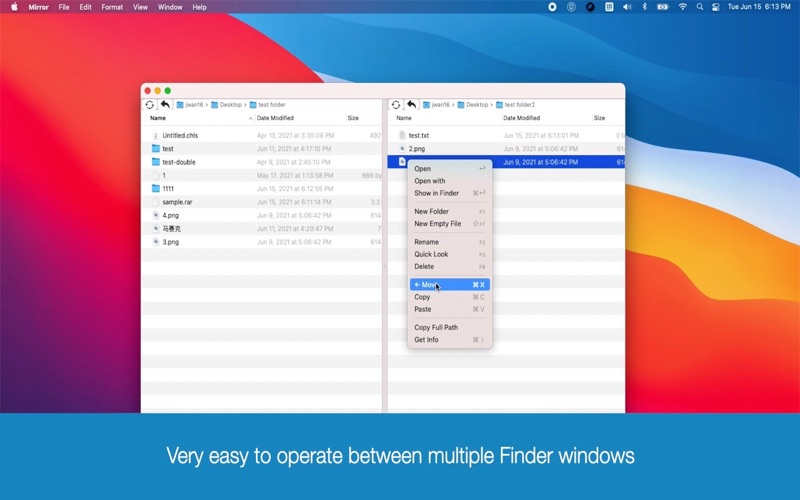
If you have ever found yourself buried under a dozen open Finder windows while trying to organize your Mac, you know how quickly desktop clutter can stall your productivity. The File Management - Move Fast utility offers an elegant solution to this exact frustration by consolidating your workspace. Instead of constantly toggling between overlapping windows or dragging files across buried tabs, this lightweight utility lets you operate two independent Finder directories side-by-side within a single, unified interface.
Developed by 经纬 宛, this application is designed specifically for macOS users who require speed and precision when managing localized assets. By streamlining your layout, it minimizes the cognitive load of file migration and keeps your creative or development workflow moving at peak efficiency.
Key Features of File Management - Move Fast
This utility is more than just a visual split-screen; it is a fully integrated workspace designed to handle everyday system tasks with minimal friction. Here is what makes the File Management - Move Fast dual Finder tool stand out:
- Seamless Dual-Pane Navigation: View and interact with two distinct system directories simultaneously without switching active windows.
- Comprehensive File Operations: Execute essential commands including opening, deleting, renaming, previewing, copying, pasting, and moving items with ease.
- Advanced Keyboard & Mouse Support: Navigate your directories using traditional mouse clicks or speed up your workflow with integrated keyboard shortcuts.
- Path Copying & Metadata: View detailed file properties instantly and copy absolute file paths directly to your clipboard for use in Terminal or other applications.
Universal Archive Decompression Built-In
Beyond standard organization, the File Management - Move Fast utility serves as a highly capable decompression engine. There is no need to launch secondary applications to extract incoming assets. The software natively supports an extensive array of compressed archive formats, including RAR, 7z, ZIP, XZ, BZIP2, GZIP, TAR, WIM, ARJ, CAB, CHM, CPIO, CramFS, DEB, DMG, FAT, HFS, ISO, LZH, LZMA, MBR, MSI, NSIS, NTFS, RPM, SquashFS, UDF, VHD, and XAR.
Who is This Mac Utility For?
This software is an excellent fit for power users, developers, digital artists, and administrative professionals who handle large volumes of documents daily. If your work relies on organizing downloads, moving assets into project folders, or extracting multi-part archives, this tool eliminates the repetitive drag-and-drop strain of standard macOS navigation.
Final Verdict
By merging a dual-pane file manager with a powerhouse extraction utility, this app provides exceptional value for macOS users seeking a cleaner, faster desktop experience. To integrate this tool into your daily productivity stack, visit the official Mac App Store to download and try it today.
Rate the App
User Reviews













Popular Apps










Editor's Choice